Network Discovery
Inventory your network, upgrade firmware, and pick the quietest channel — from one window.
Native Windows tool for discovering and managing the devices on your local network: a persistent inventory filed under your towers, MikroTik & Ubiquiti firmware upgrades, and a built-in spectrum analyser. 7-day free trial, then a lifetime license for one computer.
From download to license
Three steps, two minutesA digitally-signed portable file — copy it and run it. No installer, no runtime, no background service.
The trial starts on first run with every feature unlocked; the status bar shows the days remaining.
Enter the key and the email you bought with. The license is perpetual for one computer and movable from inside the app.
485f36b1fc37e95fe50463b596c44e99de9538b7b8d1b011ed6202404f317d42Verify the file before running itInside the app
6 screenshotsFeatures built to perform
The My devices page keeps your equipment between sessions, filed under towers with the names you gave them — whether or not they answered today.
Recognises MikroTik, Ubiquiti, TP-Link, Omada and Mimosa through neighbour-discovery protocols, mDNS, web fingerprints and read-only SNMP.
Checks the official RouterOS and airMAX feeds, checksums the image on your computer, and refuses a wrong architecture before a byte is sent.
Runs Ubiquiti radios' spectrum analyser inside the app, ranks the channels and names the quietest — no Java, no browser.
Sign in to read name, SSID and signal, and let live readings keep themselves current on a timer you choose.
Ping reports every reply with its latency beside the summary, and the internet throughput test moves live while it runs.
No telemetry, no ads, no account. Credentials are sealed with Windows DPAPI on your computer and never leave your network.
A digitally-signed native Rust app in one executable — copy it and run it. No installer, no background service.
Credentials are sent only to the device you entered them for and never leave your network; they are kept on your computer sealed with the Windows Data Protection API, tied to your account. No ads, no telemetry, no account required — nothing about your network leaves your computer except a firmware image you chose, to the device you chose.
Product details
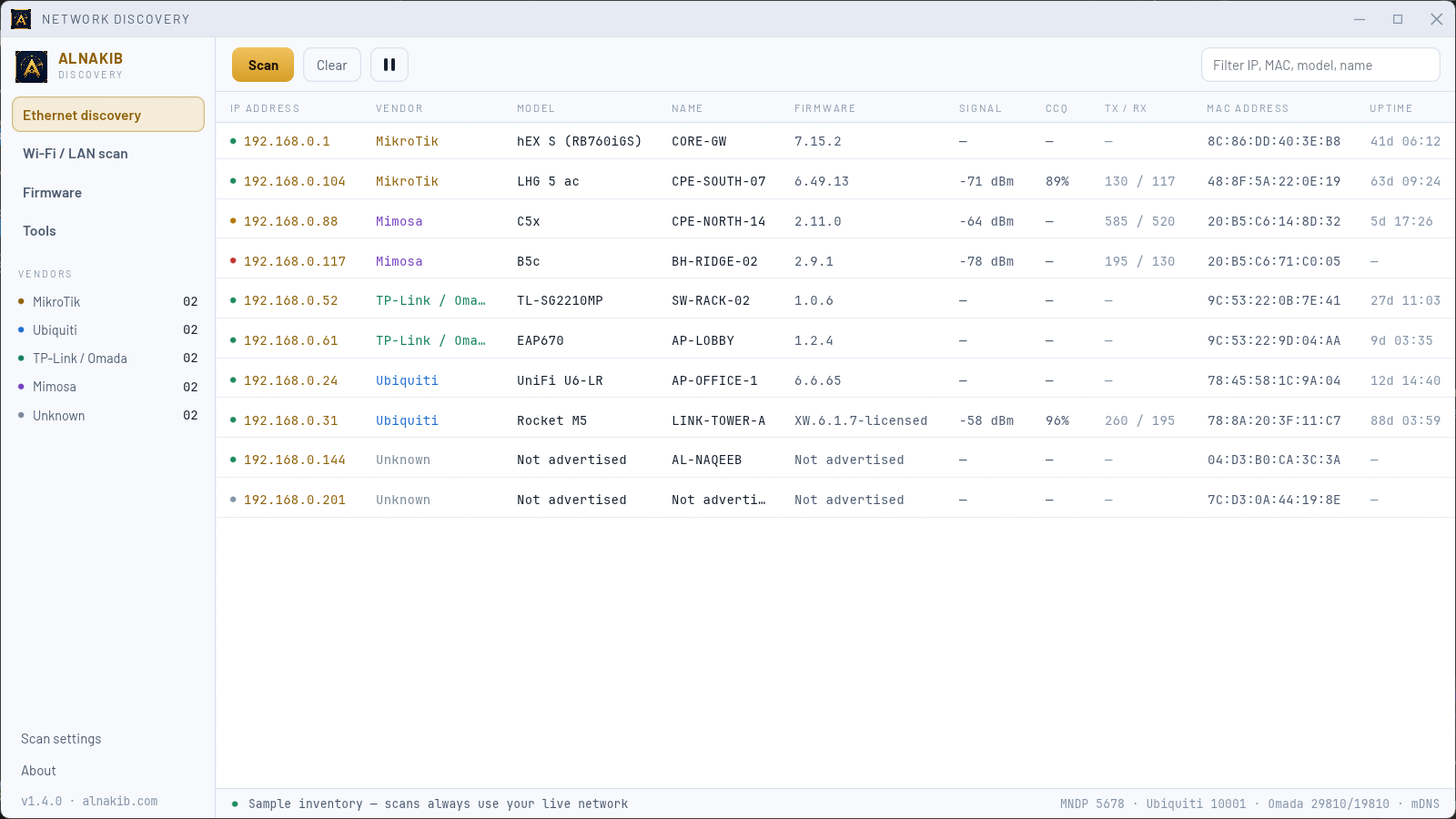
Network Discovery is a native Windows application in a single executable — no installer, no runtime, no background service. It inventories the network equipment around you in one dense, readable table: address, vendor, model, name, firmware, MAC address and uptime, with a colour-coded tally of what was found and a filter across every column.
It recognises MikroTik, Ubiquiti, TP-Link, Omada and Mimosa equipment through the neighbour-discovery protocols those vendors already broadcast, along with mDNS, the Windows neighbour cache, web fingerprints and a read-only SNMP lookup. The Wi-Fi & LAN page sweeps your adapter's subnet or a routed range you save, and a value a device does not advertise is reported as "Not advertised" rather than guessed. The My devices page keeps a persistent inventory between sessions, filed under your towers.
The firmware page checks the public release feeds where one exists — MikroTik RouterOS, Ubiquiti airMAX and airFiber — and upgrading happens right there: the image is checksummed on your own computer, sent over the device's own authenticated interface, and a file built for the wrong architecture is refused before a byte is sent. Sign in to your own equipment to read name, SSID and signal, keep them current with live readings on a timer, and run the spectrum analyser inside the app to pick the quietest channel.
Your credentials are yours: they are sent only to the device you entered them for, never leave your network, and are kept sealed with the Windows Data Protection API, tied to your account. No telemetry, no advertising, no account required — nothing about your network leaves your computer except a firmware image you chose, to the device you chose.
The edition sold here starts with a fully-featured 7-day free trial, then activates with a lifetime license key covering one computer — movable to another from inside the app, and working offline between periodic confirmations. Network Discovery is an independent interoperability utility; MikroTik, Ubiquiti, TP-Link, Omada and Mimosa are trademarks of their respective owners, and this application is affiliated with none of them.
What you'll get
- One portable Windows executable (digitally signed)
- Fully-featured 7-day free trial
- Lifetime license for one computer — one payment
- Future updates included
Requirements
- Windows 10 or 11 (64-bit)
- Local-network access — allow the app in Windows Firewall when asked
Frequently asked questions
How does the free trial work?
Can I move the license to another computer?
Does it need a permanent internet connection?
Which devices can I sign in to?
Is this the Microsoft Store edition?
Run it now — 7 full days
Download the file and run it. If it fits your work, the lifetime key is $9.99 one-time; if not, delete the file and nothing of it remains on your computer.